WinFindr is a great tool for searching for files based on their content in Windows. One of its special features is that it can compare two search results and show you what changed between them.
Here is a video that shows how you can see what leftovers are left behind after uninstalling WinRAR using its default uninstaller:
To see what has changed in your system with WinFindr, you can perform two searches and compare the results:
- Open WinFindr. Download it now if you haven’t already.
- Enter a search word or phrase in the search box. For example, “WinRAR”.
- Click on the “Start” button to start the search.
- Click the Menu button and save your results as HTML file, for example as WinRAR_before.html
- Uninstall WinRAR using its default uninstaller.
- Run the same search again and save the results as HTML file, for example as WinRAR_after.html
- Click on the Menu button and choose “Compare Results” and select the two HTML files to compare.
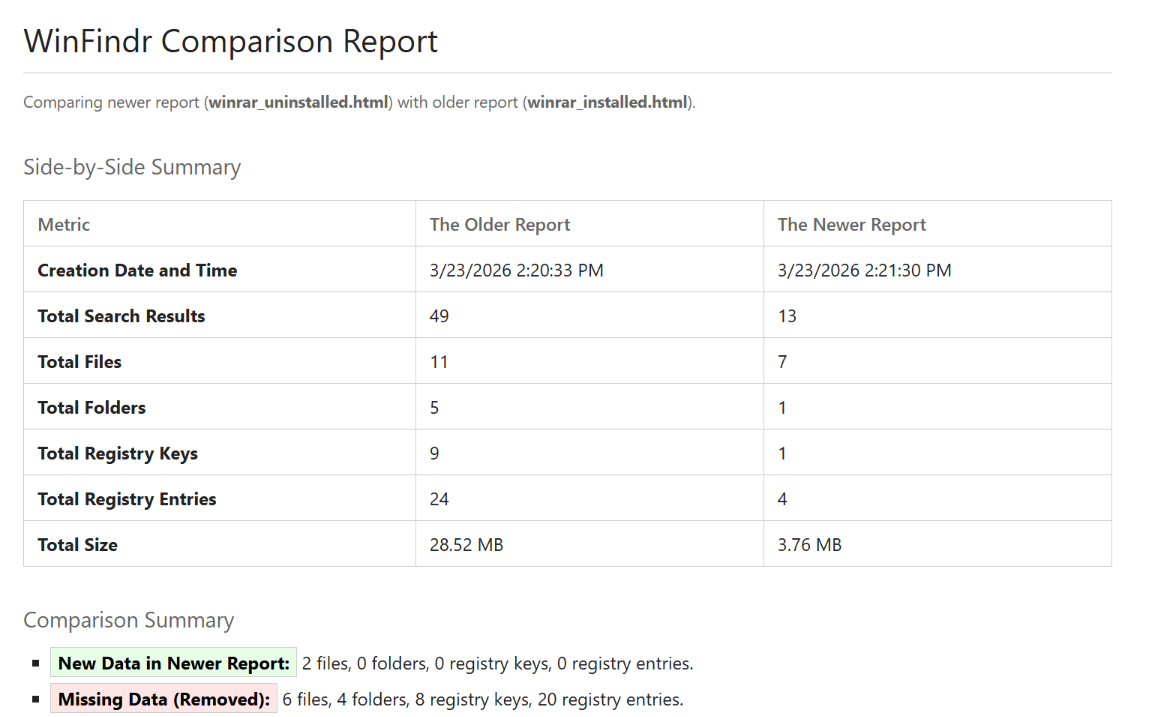
- WinFindr creates a comparison report showing what changed between the two search results.
This is how the the comparison report looks like:
Download WinFindr
What are you waiting for? Download WinFindr now. It won’t cook you breakfast but it will make your life easier.