WinFindr is a great tool for finding large files in Windows. It is a lightweight and fast Windows file search tool that can find large files in Windows with ease.
To find large files in Windows with WinFindr, you need to follow these steps:
- Open WinFindr. Download it now if you haven’t already.
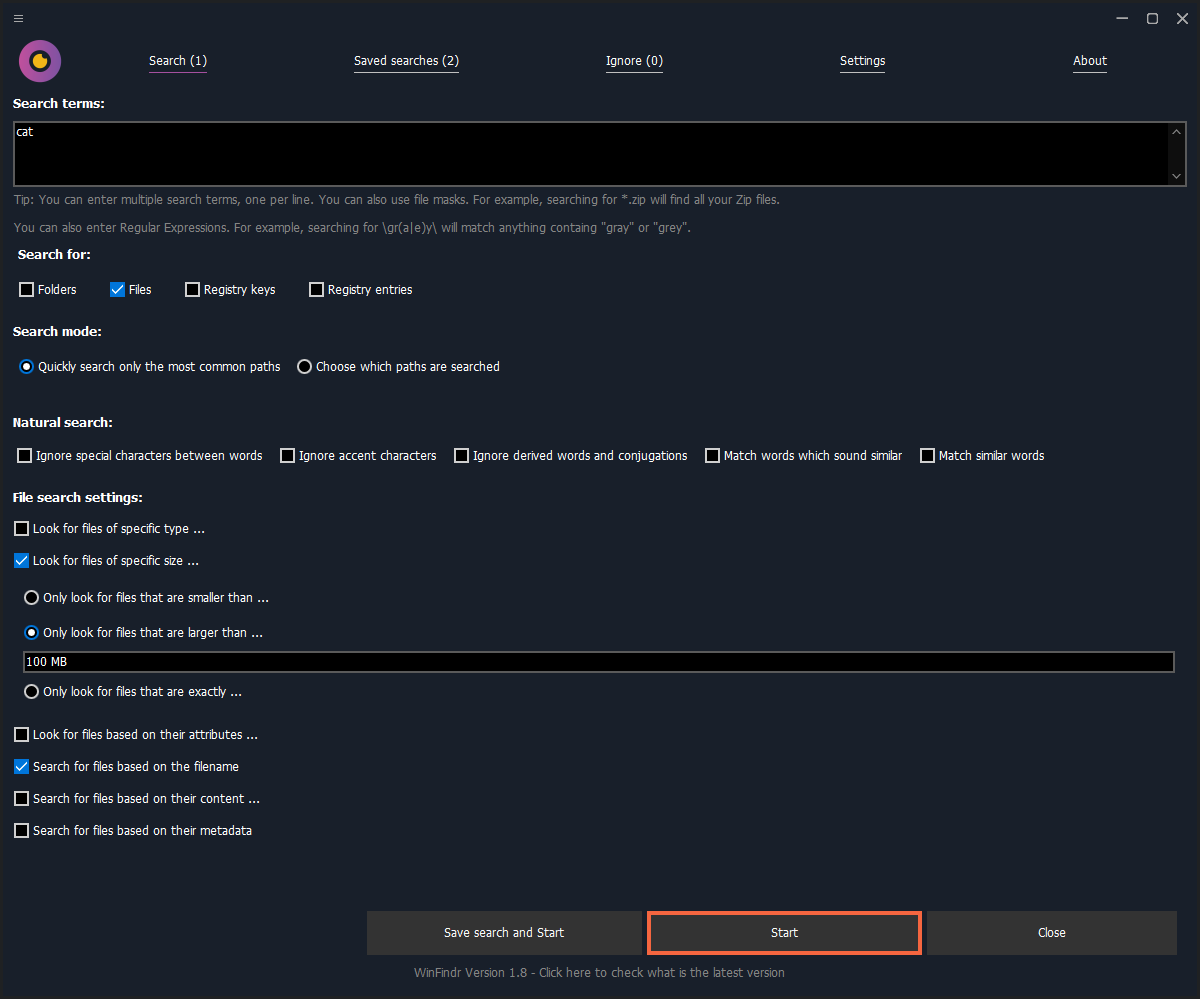
- Enter a search word or phrase in the search box. For example, “cat” because one needs to be looking for one’s cat.
- Control-Click on the “Files” checkbox to only search for files. (Optional step)
- Select “Look for files of specific size ...” and “Only look for files that are larger than ...”
- Enter the size you want to search for. For example, 100 MB.
- Click on the “Start” button to start the search.
- WinFindr will now search for all files that are larger than 100 MB.
This is how the the search would look like:
Read more about how to find large files in Windows
If you want to read more about how to find large files in Windows, you can check out the following article from our blog: How to find large files on Windows
Download WinFindr
Knock, knock.
Who’s there?
App.
App who?
App-solutely what you need to download now!